

Keeping safe online at Christmas Campaign.
Get Safe Online
West Sussex County Council in partnership with GetSafeOnline.org have launched this years safe Christmas Campaign.
Please take a moment to look at the excellent tips below and lets all keep safe online this Christmas.
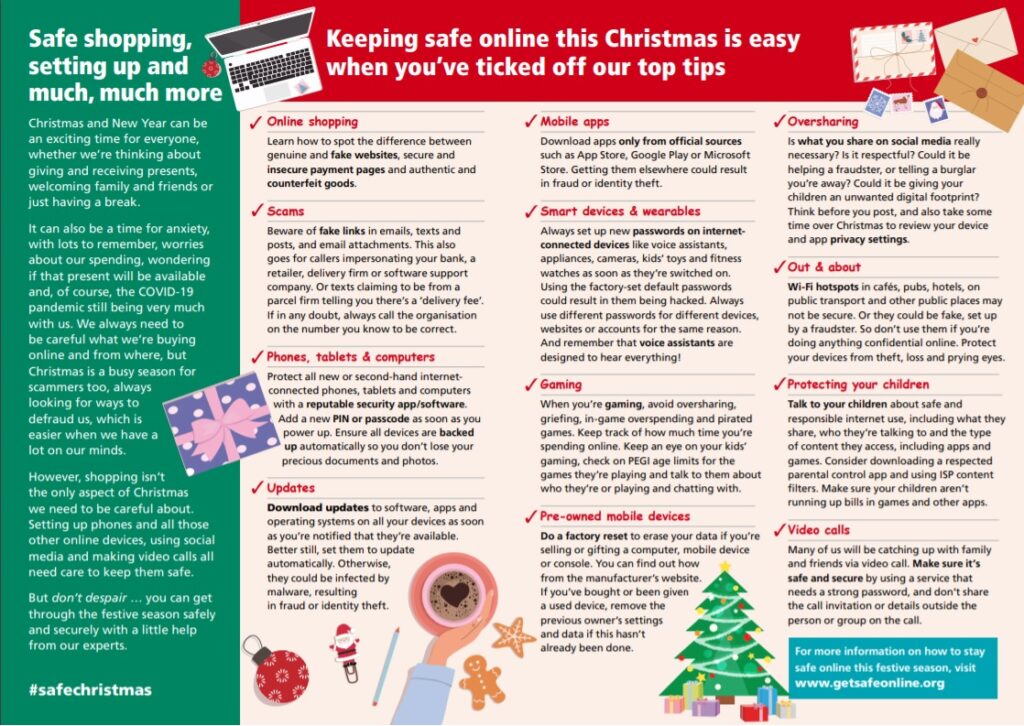
You can click the image opposite to view a poster, or click the button below to visit the getsafeonline.org safe shopping page.
Safe shopping, setting up and much, much more.
Christmas and New Year can be an exciting time for everyone, whether we’re thinking about giving and receiving presents, welcoming family and friends or just having a break.
It can also be a time for anxiety, with lots to remember, worries about our spending, wondering if that present will be available and, of course, the COVID-19 pandemic still being very much with us. We always need to be careful what we’re buying online and from where, but Christmas is a busy season for scammers too, always looking for ways to defraud us, which is
easier when we have a lot on our minds.
However, shopping isn’t the only aspect of Christmas we need to be careful about. Setting up phones and all those other online devices, using social media and making video calls all need care to keep them safe.
But don’t despair … you can get through the festive season safely and securely with a little help from our experts.
Online shopping
Learn how to spot the difference between genuine and fake websites, secure and insecure payment pages and authentic and counterfeit goods.
Scams
Beware of fake links in emails, texts and posts, and email attachments. This also goes for callers impersonating your bank, a retailer, delivery firm or software support company. Or texts claiming to be from a parcel firm telling you there’s a ‘delivery fee’.
If in any doubt, always call the organisation on the number you know to be correct.
Phones, tablets & computers
Protect all new or second-hand internetconnected phones, tablets and computers with a reputable security app/software.
Add a new PIN or passcode as soon as you power up. Ensure all devices are backed up automatically so you don’t lose your precious documents and photos.
Updates
Download updates to software, apps and operating systems on all your devices as soon as you’re notified that they’re available.
Better still, set them to update automatically. Otherwise, they could be infected by malware, resulting in fraud or identity theft.
Mobile apps
Download apps only from official sources such as App Store, Google Play or Microsoft Store. Getting them elsewhere could result in fraud or identity theft.
Smart devices & wearables
Always set up new passwords on internet-connected devices like voice assistants, appliances, cameras, kids’ toys and fitness watches as soon as they’re switched on.
Using the factory-set default passwords could result in them being hacked. Always use different passwords for different devices, websites or accounts for the same reason.
And remember that voice assistants are designed to hear everything!
Gaming
When you’re gaming, avoid oversharing, griefing, in-game overspending and pirated games. Keep track of how much time you’re spending online. Keep an eye on your kids’ gaming, check on PEGI age limits for the games they’re playing and talk to them about who they’re or playing and chatting with.
Pre-owned mobile devices
Oversharing
and app privacy settings.
Out & about
Wi-Fi hotspots in cafés, pubs, hotels, on public transport and other public places may not be secure. Or they could be fake, set up by a fraudster. So don’t use them if you’re doing anything confidential online.
Protect your devices from theft, loss and prying eyes.
Video calls
Many of us will be catching up with family and friends via video call. Make sure it’s safe and secure by using a service that needs a strong password, and don’t share the call invitation or details outside the person or group on the call.
Protecting your children
Talk to your children about safe and responsible internet use, including what they share, who they’re talking to and the type
of content they access, including apps and games. Consider downloading a respected parental control app and using ISP content filters. Make sure your children aren’t running up bills in games and other apps.